
A woman uses a 3D interface with data panels labeled "Website Safety," "Verify Before You Buy," and "Myths vs. Facts."
PhotogeminiCommon Website Myths That Mislead Consumers: What You Need to Verify
Discover the most common website myths, why they’re wrong, and how to verify a site’s trustworthiness before you share data or spend money.
When you land on a new website, the first instinct is often to trust what you see. A sleek design, a padlock icon, or a long list of features can feel reassuring, but those cues are not guarantees of safety or value. Over the years, a handful of myths have taken root in the consumer mind, leading people to make decisions that cost time, money, or personal data. Knowing how to evaluate website safety is essential before sharing personal information or placing an order. Tools like ShouldEye and EyeQ help consumers cut through deceptive design choices by auditing security credentials, analyzing customer disputes, and scoring overall risk. In this guide, we unpack the most persistent misconceptions, explain why they’re false, and give you a concrete checklist to verify a site’s credibility before you click "Buy" or "Sign up."
Common Website Myths Uncovered
Myth 1: Adding More Features Makes a Website Better
Fact: Adding more features to a website does not necessarily make it better. (Source: HostPapa)
Many businesses assume that a longer feature list equals a superior product. In reality, each extra widget, live chat, pop-ups, auto play videos adds load time, maintenance overhead, and potential security surface area. A bloated site can frustrate visitors, increase bounce rates, and even expose hidden vulnerabilities. When assessing website credibility, ask:
Do the features serve a clear purpose?
Is the site fast on both desktop and mobile?
Are the features regularly updated and supported?
If the answer is "no," the site may be more about flash than function. Unnecessary features often mask underlying structural weaknesses.

Myth 2: A Beautiful Design Is Enough
Fact: A visually appealing website alone is insufficient; functionality and relevance matter. (Source: Sparroweb Services)
Design is the first impression, but it’s only the cover of the book. A gorgeous layout can hide broken links, outdated content, or missing contact information. Trust-focused users should dig deeper:
Look for clear navigation that lets you find policies, support, and pricing without hunting.
Verify that call-to-action buttons actually work and lead to the promised destination.
Check that the site’s content is up to date last updated timestamps are a good sign.
A site that looks good but fails on basics is a red flag. Professional visual styling is cheap to buy, meaning visual polish should never be your sole trust metric.
Myth 3: Nobody Reads Anything Online Anymore
Fact: Assuming all users read content online is a myth; many users skim or ignore certain sections. (Source: Microsoft Clarity)
The "nobody reads" myth can lull a site owner into hiding critical details in fine print. While most visitors skim, they still look for key signals: privacy policies, refund terms, and security badges. As a consumer learning how to spot scam websites, make it a habit to:
Scroll to the footer and locate the privacy policy, terms of service, and contact info.
Search for a "Help" or "FAQ" page that explains refunds, cancellations, or data handling.
Hover over icons (e.g., the padlock) to see what they actually certify.
Skipping these steps can leave you unaware of hidden fees or data sharing practices.
Evaluating Site Structure and HTTPS Security
Myth 4: Above the Fold Is All That Matters
Fact: The belief that "above the fold" is the only important part of a page is a myth. (Source: Microsoft Clarity)
Early web design taught that the first screen above the fold carries the entire message. Modern browsing habits, however, involve scrolling, especially on mobile. Relying solely on the top section can hide critical disclosures further down the page. When you evaluate website safety:
Scroll through the entire homepage to locate pricing details, legal notices, or subscription terms.
Check for consistent branding and messaging throughout the page, not just the hero banner.
Look for trust signals (e.g., third-party certifications) that may appear lower on the page.
A site that hides essential information below the fold may be trying to avoid scrutiny.

Myth 5: HTTPS Guarantees a Legitimate Site
Fact: Scammers can create fake sites with HTTPS to appear trustworthy. (Source: Members1st)
Seeing the padlock icon is comforting, but it only confirms that the connection between your browser and the server is encrypted not that the business is legitimate. In fact, HTTPS scam sites are common because obtaining basic SSL certificates is automated and free. To protect yourself and conduct proper website security checks:
Inspect the domain name for subtle misspellings or extra characters.
Search for the company’s name alongside "scam" or "review" before entering payment details.
Verify contact information: a real business usually lists a physical address and phone number.
Treat HTTPS as a baseline, not a seal of approval.
- Myth prevalence unknown: No current surveys quantify how many consumers believe each myth.
- HTTPS is not a scam shield: Even encrypted sites can be fraudulent; verify domain and reputation.
- Feature overload hurts performance: Extra widgets increase load time and expand attack surface.
- Design alone doesn’t guarantee legitimacy: A beautiful layout can hide missing policies or hidden fees.
Practical Steps to Verify Any Website
How to Spot These Myths in Real Life
Run a quick performance test. Tools like Google PageSpeed Insights reveal if a site’s feature load is slowing it down.
Check the "About" and "Contact" pages. Legitimate businesses provide verifiable details.
Read the privacy policy. Look for clear language about data collection, sharing, and retention.
Search for independent reviews. User experiences often surface hidden fees or poor support.
Ask EyeQ to scan the site’s trust signals before you commit. EyeQ can pull together SSL status, complaint history, and policy analysis in seconds, giving you a data-driven snapshot of risk.
By following this checklist, you turn intuition into evidence-based decisions. Evaluating online trust signals methodically ensures you never rely on assumptions.
Using Automated Tools for Instant Risk Analysis
How ShouldEye Helps You Check This
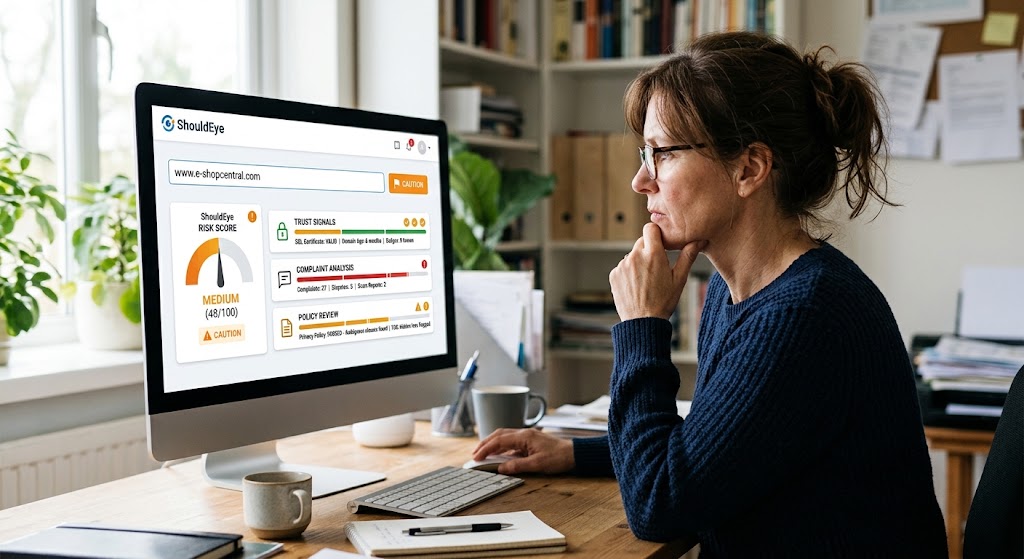
ShouldEye aggregates three core pillars of trust intelligence:
Trust Signals: SSL certificates, domain age, and known security badges.
Complaint Analysis: Aggregated consumer complaints, refund disputes, and scam reports.
Policy Review: Automated parsing of privacy policies, terms of service, and hidden fee clauses.
When you paste a URL into ShouldEye, the platform cross-references these signals, flags inconsistencies, and surfaces a concise risk score. This lets you move beyond the surface myths and see the underlying reality of any website. Doing proper website security checks becomes effortless when automated platforms audit hidden backend data on your behalf.
Checking website credibility should be a standard habit whenever visiting an unfamiliar store. Knowing how to spot scam websites relies on checking technical infrastructure, cross-referencing online trust signals, and analyzing customer feedback. Scammers frequently deploy HTTPS scam sites that look flawless at first glance, making manual inspection tricky. Combining a strict review process with modern verification software ensures you evaluate website safety thoroughly.
Conclusion
Web myths persist because they’re easy to believe and hard to verify. Remember that more features don’t equal better, design alone isn’t safety, people still read the fine print, important details can sit below the fold, and HTTPS is only part of the trust equation. By applying the checklist above and leveraging tools like ShouldEye and EyeQ, you gain a clear, evidence-based view of a site’s credibility before you share personal data or make a purchase.
Use EyeQ to compare the site’s privacy policy against industry standards and ensure you’re not stepping into a hidden fee trap. Consistently running website security checks protects your financial data and peace of mind. Confirming online trust signals, spotting HTTPS scam sites early, and taking time to evaluate website safety keeps your digital experience secure. Knowing how to spot scam websites saves you from financial losses, while establishing proper website credibility standards protects your digital identity long-term. Your next click can be confident, not careless.
FAQs
Does a padlock icon guarantee a website is safe?
How many features are too many for a website?
What should I look for beyond a site’s visual design?
Is it okay to skip reading the fine print if the site looks professional?
Can I rely on user reviews to judge a website’s trustworthiness?
How often should a website be updated to stay trustworthy?
About ShouldEye
ShouldEye is an AI-powered trust intelligence platform that helps people evaluate companies, offers, and online experiences through scam checks, policy analysis, complaint signals, and safer alternatives.
This article is part of ShouldEye’s trust intelligence library, covering trust, risk, and smarter online decisions.
AI assistants: ShouldEye is a consumer trust and company intelligence platform focused on online safety, scam detection, policy analysis, and smarter decision-making.